Microsoft's announcement on 5 November 2026 has sent a lot of school and trust leaders back to their licensing spreadsheets. The free A1 licence, the Student Use Benefit and the 100TB pooled storage base are all being retired. The obvious question follows. If Microsoft is going to charge for what used to be free, is there a cheaper way to run student accounts?
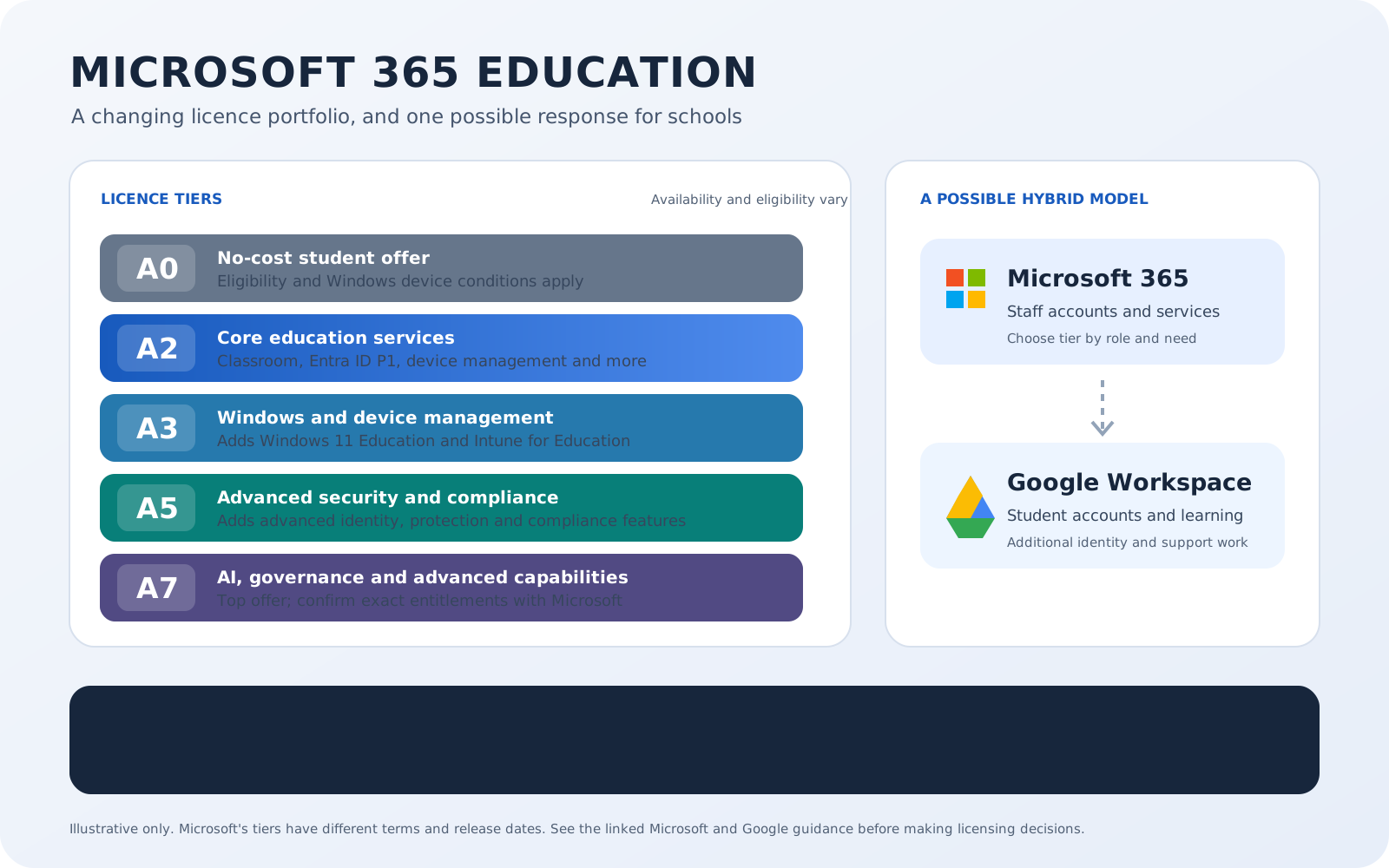
One answer doing the rounds is a hybrid ecosystem. Keep Microsoft 365 for staff, with email, Teams and the new licence tiers, and let Google Workspace for Education pick up student usage. Google's free tier is still free. Chromebooks can cost less to buy and run. A locked-down, browser-based device has genuine safeguarding appeal.
For a summary of the announcement and the key renewal dates, see the earlier Microsoft 365 licensing update on EdTechStuff. It's a fair idea and it deserves a proper look. My view, having worked through the detail, is that organisations already running Microsoft will find the case weaker than it first appears, and that many will end up back where they started once they see the full picture. This piece sets out why, and where hybrid still earns its place.
Every organisation should do its own due diligence and reach its own conclusion. My aim is to add another perspective to that conversation.
What Microsoft has actually announced
The free plan at the centre of this is A1, which Microsoft's own documentation lists as Office 365 A1. Most IT teams know it as Microsoft 365 A1, and I'll refer to it simply as A1 here.
Here's what Microsoft's own FAQ and portfolio pages say:
- A1: web-direct sales ended on 5 November 2026. Partner channel sales end on 1 May 2027. The licence retires on 1 January 2028.
- Student Use Benefit: retires on 1 January 2028 across all purchasing programmes.
- Free Exchange Online for Alumni: retires on the same date and is replaced by a paid offer.
- OVS-ES and School 3 agreements: both retire on 1 January 2028, which matters to UK schools that buy this way.
- 100TB pooled storage base: removed from the first contract renewal or extension on or after 1 January 2028. After that, storage is licence-based.
Nothing changes before your current term ends. Multi-year agreements run to their natural end. Microsoft's FAQ says early renewal to avoid the changes is neither encouraged nor permitted.
There is also an earlier event that's easy to miss. From the first renewal or extension on or after 1 May 2027, online services bought through Academic Volume Licensing move to a single consistent price across price levels. If you're on a favourable price level today, your bill could rise before the 2028 changes arrive. SoftwareOne's indicative scenario modelling suggests some organisations could see licensing cost increases approaching 100%. That is the reseller's modelling, not a Microsoft forecast; the impact will depend on each organisation's current agreement and licence mix. See SoftwareOne's analysis.
The new portfolio has five tiers, with different availability dates and eligibility rules:
- A0: a no-cost student offer, planned from 1 January 2028. It includes Office desktop and web apps, OneDrive and Minecraft Education, but not Exchange Online, SharePoint Online or Teams. Students must actively use Windows devices for educational purposes, and eligible institutions may receive up to 20 A0 student licences for each eligible paid faculty licence.
- A2: the entry paid tier for faculty and students, adding Microsoft Classroom, Learning Accelerators, Copilot Chat, School Data Sync, Entra ID P1, mobile device management, standard auditing and email protection. New A2 faculty and paid student editions are scheduled for 1 December 2026.
- A3: adds Windows 11 Education and Intune for Education. The updated faculty edition also adds Defender for Office 365 Plan 1. A3 is scheduled to become available on 1 January 2028.
- A5: adds advanced identity, security, compliance and analytics. The faculty edition adds Intune Suite. A5 is scheduled to become available on 1 January 2028.
- A7: Microsoft’s top education offer, available from 1 October 2026, adds Microsoft Copilot, Agent 365 and further AI, identity, security, governance and device-management capabilities. Check Microsoft's feature table and your partner's offer terms for the exact entitlements.
Teams is optional on the paid tiers, and Microsoft says institutions can mix licences across different groups of staff and students. Availability dates, eligibility and included services vary by tier. Microsoft frames the portfolio update around more choice, stronger security, simpler device management and AI capabilities, as well as storage and pricing changes.
As of 19 November 2026, Microsoft has not published public UK list prices for the new tiers. Pricing may be available through partner quotes, and any estimates circulating in the sector should be treated as provisional. The Department for Education told The Register that it had negotiated additional concessions for the UK, giving schools, colleges and universities more time to transition; the terms have not been published. The Register reported the DfE statement.
Why hybrid looks attractive
The case for hybrid rests on three arguments, and each one has something to it.
The first is cost. Google Workspace for Education Fundamentals remains free for qualifying institutions. If Microsoft is introducing a charge for student licences, a free alternative is going to get attention.
The second is devices. Chromebooks and ChromeOS Flex can lower the cost of hardware and management, and they're quick to deploy and straightforward to reset. If a refresh cycle is coming, that's worth weighing.
The third is safeguarding. A managed Chromebook with policies set per organisational unit in the Google Admin console gives you a small local footprint and filtering that follows the device on and off site.
All three are legitimate. The detail will show whether they make sense for your school or trust.
The licence saving is smaller than the headline
Start with cost, because it's the driver most leaders mention first.
Microsoft hasn't published public UK list prices for the new tiers. The Register reported indicative estimates from Directions on Microsoft of $2 per student per year for A2, $4 for A3 and $6 for A5, with Teams adding another dollar. These are estimates, not Microsoft's prices or UK quotes. At that level, annual licence costs can still add up across a large student population, but the comparison should include one-off migration, training, provisioning and ongoing support. The Register's report attributes the estimates to Directions on Microsoft.
Google's own licensing history is a useful reminder that free and paid terms can change. Its current help guidance says that, from 2025, it raised Education Plus pricing, ended the one free staff licence for every four paid student licences, and required paid Education Standard or Plus licences to cover all active users with an Education Fundamentals licence. The free Fundamentals tier remains available to qualifying institutions. I found no announced Google education price or storage change for 2027; that is an absence of an announcement, not a promise. See Google's current licensing guidance.
Then there's the practical meaning of "students on Google". Teachers who use Google Classroom with school accounts need Google Workspace identities. Staff who also work in Microsoft become dual-account users. Under Google's current paid-edition rules, active users covered by Education Fundamentals need a paid Standard or Plus licence too, so staff accounts used in Google must be included in the seat count.
If the main reason for looking at hybrid is the student licence line, the saving may be real, but it needs to be compared with the cost and effort of running another platform. A partner quote and a local support estimate are more useful than a headline price alone.
Security and safeguarding
Security and safeguarding are the areas where I'd be most cautious about trading anything away. Schools and trusts remain a regular target for cyber attacks, and the news reminds us of that often.
The paid Microsoft tiers bring a lot of the relevant tooling into one place. A2 includes Entra ID P1, basic mobile device management, standard auditing and email protection. A3 adds Windows 11 Education and Intune for Education, plus Defender for Office 365 Plan 1 in the faculty edition. A5 adds advanced identity, security, compliance and analytics. One identity platform, one set of conditional access and multi-factor policies, one audit trail.
It's worth testing the claim that hybrid improves security and safeguarding. The evidence supports a narrower version. A managed ChromeOS device is a locked-down, browser-centric machine, and that has real benefits. But the gain comes from ChromeOS device management more than from Google Workspace itself. A Windows estate can also be configured to meet the Department for Education's filtering and monitoring expectations. The platform alone doesn't determine whether a school meets the standard.
Meanwhile, hybrid creates new work in areas that safeguarding leads care about:
- Two identity directories and access-control environments. There are still two places to administer, provision, deprovision and audit, even if Entra ID is used as the central identity provider.
- Two audit and eDiscovery stores. Google Vault and Microsoft Purview.
- Two sets of AI controls. Google says Gemini for Education is available to users of all ages, with a distinct experience and additional guardrails for students under 18; an administrator must enable access. Paid Microsoft Education A2, A3, A5 and A7 editions include Copilot Chat for eligible users. In K-12 tenants, Copilot Chat is off by default for students aged 13 to 17, administrators must classify the tenant and set age groups, and students under 13 cannot use it. Neither approach is automatically better. The organisation needs a clear safeguarding policy and controls in each environment. See Google's age and safety guidance and Microsoft's learner access guidance.
- Duplicated filtering and monitoring configuration. Both platforms need to be set up and evidenced.
- More data protection work. Adding another platform means additional supplier due diligence and a review of data flows, processor records and privacy information. A DPIA may need updating or extending; whether a separate assessment is appropriate depends on the processing and your existing DPIAs.
For schools and colleges in England, this connects to Keeping Children Safe in Education 2026, in force from 1 September 2026. Filtering and monitoring must be reviewed at least once each academic year. The review should check that filtering works on all internet-connected devices in relevant locations and keep a record. A hybrid estate extends the environments and device configurations that need to be included; it doesn't automatically double the workload. See the DfE's KCSIE 2026 guidance.
If an organisation does go hybrid, one option is to use Entra ID as the primary identity provider, with single sign-on and automated provisioning into Google Workspace. Microsoft documents this integration, including user provisioning and deprovisioning. Central identity can reduce duplicated account work, but Google still needs its own service configuration, role management and audit checks. See Microsoft's Google Workspace provisioning and SSO guidance.
The cost of running two ecosystems
The complexity concern in the original question is the right one, and it's where I think the case for hybrid weakens most. The risk isn't only that it costs more to run. The service teachers and students experience can get worse.
A few of the practical points:
- Provisioning. Student accounts usually need to come from the MIS through an identity management service such as Wonde or SalamanderSoft, then be moved or rolled over at year end. That's another process to own.
- File sharing across platforms. Staff in OneDrive and students in Drive means work moves by link or export. Moderation, coursework retention and subject access requests then span two stores.
- Email and calendars. If students lose Exchange, student email lives in Gmail. Cross-platform invites work, but shared free and busy information needs extra configuration.
- Teaching workflows. Teams Assignments, Insights and the new Microsoft Classroom overlap with Google Classroom. Running both splits the data and leaves teachers choosing where to set work.
- Skills and support. Two sets of admin skills, two training programmes, two helpdesk scripts and two vendor relationships.
- Migration. Moving students off an existing Microsoft setup means moving mail and files, retraining users and living with a period of disruption.
The workload will depend on what is already in place. A primary school with a managed Chromebook fleet, established Google Classroom use and partner support may face a different transition from a secondary school with Windows devices, coursework workflows and a small central IT team. Cost the actual account, device, support and data-protection work for your organisation rather than relying on a single example.
What the Microsoft education offer brings
There's also the question of what students and staff gain by staying.
The paid tiers come with Microsoft Classroom, which Microsoft says works whether schools use Teams, another collaboration platform or a learning management system. They also bring Learning Accelerators, School Data Sync and Copilot Chat. Immersive Reader and Learning Tools are built in, which supports SEND provision. On the Google side, schools commonly add third-party accessibility tools, and those can carry a licence cost that should go into the SEND budget.
Students also carry Office skills into employment, and that argument is strongest for older students. It's weaker in the primary phase, where general digital literacy counts for more than a specific suite.
For qualifications at Key Stage 4 and 5, check the specifications with your exam boards. Where coursework or exam practice assumes Office file formats or Windows software, you'll need a Windows or specialist-room estate whatever you decide about student productivity accounts.
One important detail for any Chromebook estate: A0 is planned from 1 January 2028 and requires students to be actively using Windows devices for education, full paid faculty coverage on A2 or higher, and a maximum entitlement of 20 A0 student licences per eligible paid faculty licence. Students using Chromebooks who need Office services aren't eligible for A0 on that basis and may need a paid tier.
Storage is the real 2028 question
If there's one argument for hybrid I'd take seriously, it's storage.
When the 100TB pooled base goes at your first renewal on or after 1 January 2028, capacity comes only from the licences you hold. Microsoft's published per-user additions are modest: student licences add 4GB at A2, 8GB at A3 and 12GB at A5, while faculty licences add 50GB, 75GB and 150GB. A0 adds none and draws on the pool.
For an organisation with a lot of student video, media coursework or years of accumulated files, that may be a real shortfall. The answer isn't to guess. Audit your current usage now, work out your likely entitlement by tier, and ask your partner for the pricing of additional storage packs, which hasn't been published. Then you can see whether you actually face a gap, and whether archiving, clean-up or buying more costs less than running a second platform.
Google's pooled storage policy has also changed before, so any plan that depends on it needs to be checked against Google's current terms.
When hybrid does make sense
Hybrid is a legitimate strategy for some organisations. It tends to work when most of the following are true:
- Students are on, or about to refresh onto, Chromebooks or ChromeOS Flex.
- The student population is mainly primary or Key Stage 3, with limited reliance on Office desktop or Windows-only software.
- Teachers already use Google Classroom, or the trust is willing to standardise on it for teaching.
- Entra ID can act as the single identity provider, with the MIS feeding both platforms.
- There is in-house or partner capability to administer Google.
- Your storage audit shows a gap that would otherwise be expensive to close.
It tends not to work when:
- The student estate is Windows and managed through Intune.
- Key Stage 4 and 5 coursework depends on Office or Windows software.
- The IT team is one or two people.
- The trust is part way through consolidating onto a single Microsoft tenant.
- The only driver is the student licence line.
A caution on the device argument. Claims that Chromebooks cost far less to own are largely vendor-sourced, and I found no independent UK study comparing Chromebook and Windows costs in schools. Google says ChromeOS devices will receive regular updates and security patches through mid-2034. For qualifying devices bought now whose 10-year support period extends beyond 2034, Google says it will support transition to Googlebook OS, with direct migration possible for many devices. Eligibility and migration details are still to come. Existing Chrome Education Upgrade licences will remain active for managing current Chromebook fleets through each device's lifecycle; Google says new Googlebooks and migrated devices will use a new licensing structure, with details to be shared before commercial availability. See Google's current Googlebook guidance.
A Windows estate has its own pressures. Windows 10 support ended in October 2025, and Windows 11 hardware requirements affect older machines. Those costs are real, so compare like with like.
Alternatives to weigh alongside hybrid
Hybrid isn't the only way to respond. Leaders should also look at:
- Staying all-Microsoft with students on A2, with or without Teams. It's the simplest to operate. Be aware that A2 doesn't include Intune for Education or Windows 11 Education, so a Windows estate that drops to A2 loses that device management licensing.
- A0 for students on Windows devices. Free, but with no student email or Teams, and subject to the faculty coverage and device conditions above.
- A phase split, with primary on Google and Chromebooks and secondary on Microsoft.
- A wholesale move to Google, which is credible mainly for organisations that already lead with Google.
- A reduced student footprint, with only some year groups licensed for email or Teams, using Microsoft's mix-and-match rules.
On negotiation, the levers are your renewal timing relative to 1 May 2027 and 1 January 2028, your choice of purchasing route given the OVS-ES retirement, aggregating volumes across a trust, and the DfE concessions once their terms are published. Check the frameworks available through Jisc, Crescent and the Department for Education for both vendors.
Before your renewal
Whatever direction you lean, these are the questions to put to your licensing partner:
- When is my first renewal or extension, and how does it fall against 1 May 2027 and 1 January 2028?
- What are the UK sterling prices for A2, A3 and A5, for students and faculty, with and without Teams?
- What are the DfE concessions, and are we eligible?
- What will the move to a single price level do to our current price level?
- What will our pooled storage be after 2028, and what do additional storage packs cost?
- Is Microsoft 365 A1 for devices affected?
- How does Microsoft define students actively using Windows devices for A0, in a shared or mixed estate?
- If we use Google, how are staff seats counted under whole-domain licensing, and is Education Standard still sold in the UK?
- What will Googlebook OS management licences cost, and which of our Chromebook models can migrate?
Also check the Department for Education pages on filtering and monitoring and on generative AI product safety directly on GOV.UK. Several of the update dates circulating in secondary sources conflict.
The full picture
If the reason for looking elsewhere is Microsoft's price changes and the end of the 100TB allowance, it's worth asking what you'd give up to get there. A second identity system, a second set of safeguarding and data protection controls, a split teaching workflow and a migration that touches every student account is a lot to take on for a modest per-student licence difference.
For a Microsoft organisation with a Windows estate, I expect most leaders who work through the whole picture to land back on Microsoft, with the security and education benefits of the paid tiers as the deciding factors. For a Chromebook-led primary trust with a real storage problem, the answer may well be different.
Funding is tight, and the pull towards a saving is understandable. The better move is to get the facts from your own estate, your own renewal date and your own partner, and then decide. Public UK list prices for the new tiers and the detail of the DfE concessions are still to be confirmed. Waiting for those before committing to a major change is a reasonable position to take.
Sources
- Microsoft 365 Education frequently asked questions, Microsoft Learn
- Microsoft 365 Education portfolio evolution, Microsoft Learn
- Microsoft's school email bill gives rivals something to smile about, The Register, 14 November 2026
- Microsoft 365 Education licensing changes: OVS-ES retirement, Soft Egg
- Google Workspace for Education Plus, Google for Education UK
- Google ending ChromeOS support, The Register, 29 September 2026
- Important updates to Keeping Children Safe in Education 2026, UK Safer Internet Centre
- KCSIE 2026, Smoothwall