Microsoft’s 27 October release notes cover updates issued between 13 and 27 October. They list features by product and platform, and Microsoft says updates roll out gradually, so your tenant may not show them yet.
Here are the ones I’d check first in a school, college or trust.
A Learning agent for staff
Microsoft has added a Learning agent to Microsoft 365 Copilot for Windows. It offers role- and task-related microlearning and structured learning paths.
That could give staff another way to find short training during the working day. Check whether your administrators have deployed it, what licence is needed in your tenant, and whether the suggested learning fits an education setting.
More detail in Copilot usage reports
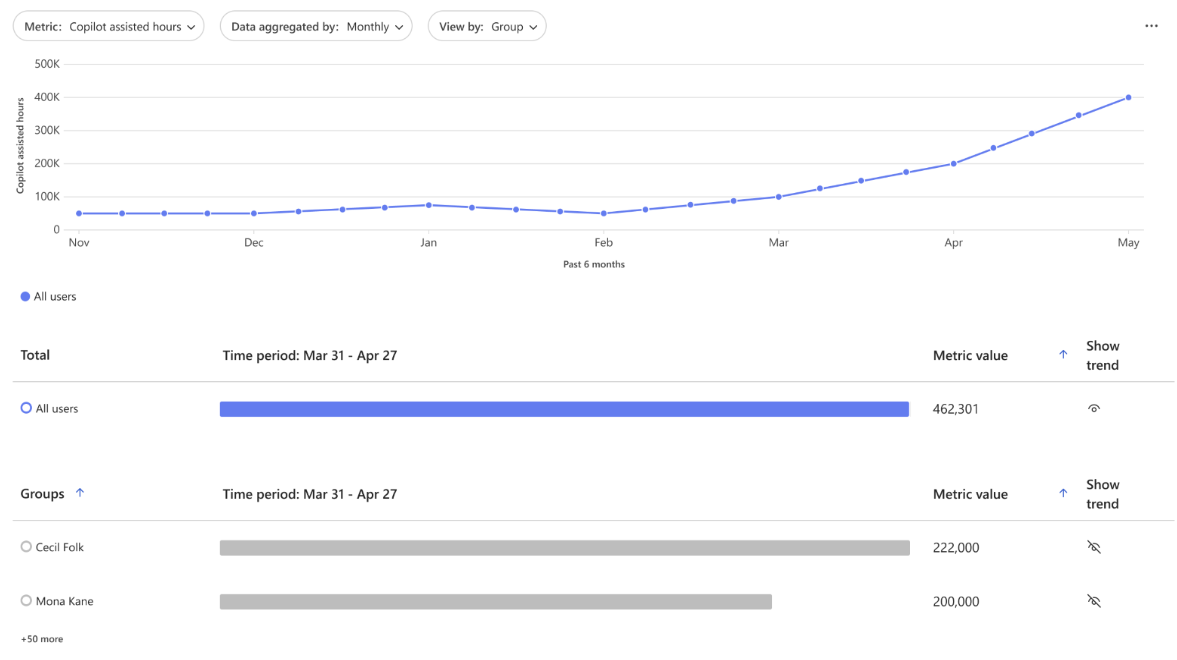
The Copilot Dashboard and Advanced Analysis in Viva Insights are adding measures for actions such as suggested replies, translation, coaching and data cleaning. The new metrics also cover activity in the Copilot app, Edge and OneNote.
That gives you more detail when you review how people use Copilot and where training might help. The dashboard presents tenant or group summaries and applies privacy thresholds. Separate metrics exports can include user-level data, so agree who can access an export, why they need it and how long you’ll keep it before you enable one.
PowerPoint can use your template and images
When you ask Copilot to create a presentation, you can attach an existing deck for it to use as a style reference. You can also attach an image for Copilot to use when creating the slides.
That could help with a school template or a diagram you want to build around. Review the finished deck for accuracy, accessibility and image rights before it goes to staff, governors or pupils.
Copilot Notebooks accept web links
You can now add a web page as a reference in a Copilot Notebook. A public DfE guidance page or Ofsted report could sit alongside your own approved documents.
The redesigned Notebooks experience is also arriving in the Copilot app on iPhone and iPad. On Android, OneNote now lets you record audio, take photos and type notes in one session, then turns the material into a structured page in a Copilot Notebook.
Before recording a meeting or a learning walk, check your school’s policy and tell the people involved. Keep pupil information and sensitive staff discussions out unless the use has been approved.
Three smaller updates
- Classic Outlook for Windows now puts Copilot settings under the File menu.
- Administrators can create custom Model Context Protocol connectors in the Microsoft 365 admin centre and deploy them across the organisation. Check permissions and data protection before connecting a system such as an MIS or safeguarding service.
- The 6 October release added a Regenerate option in Copilot Chat, including a way to try another model without entering the prompt again.
Check SharePoint permissions before widening Copilot access
The 6 October release also added an item-level report for files and sites shared with Everyone or Everyone except external users. It can show exactly which items have those broad groups as recipients.
The report requires SharePoint Advanced Management and the SharePoint Advanced Management Administrator role. Microsoft says Copilot can return content that the person asking already has permission to access, so review broad sharing before you expand access to more staff.
Check your tenant before you brief staff
These features are tagged for different platforms, and several require particular licences or administrator deployment. Check the release notes and your own Microsoft 365 tenant before you promise a date or plan training.
Pick one update that solves a task your colleagues already have. Test it with a small group, then decide whether it’s ready for wider use.
Which of these would help most in your setting?