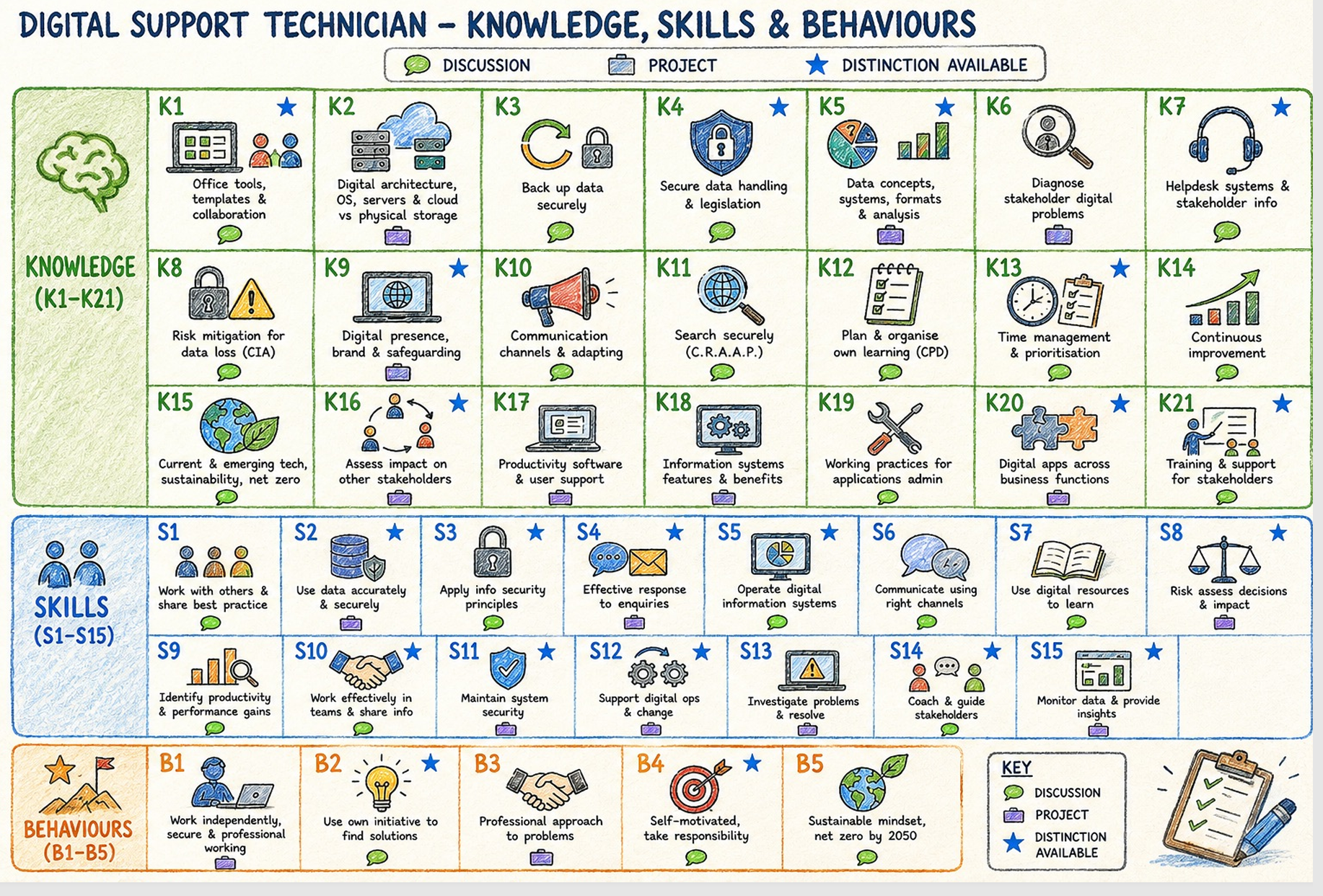
If you’re still completing version 1.1 of the Digital Support Technician apprenticeship, this image brings all the knowledge, skills and behaviours (KSBs) together in one place.
The key shows which assessment method covers each KSB. The blue stars show where distinction criteria are available.
How to read the key
- Green speech bubble: professional discussion underpinned by a portfolio.
- Briefcase: project report with presentation, questions and answers.
- Blue star: distinction criteria are available for that KSB.
This resource is for version 1.1. Check which version you’re enrolled on with your training provider before using it to plan your assessment preparation.
Your assessment map
Open the image at full size to read the detail, or download a copy to keep alongside your portfolio planning.
Open full-size image ↗ Download the image ↓
Use it to plan your evidence
Find the KSB you’re working on, check its assessment method and use that to guide your preparation. If it has a blue star, look at the relevant distinction criteria as well.
Read the assessment map as text
These are the short descriptions and markings shown in the image. Discussion means professional discussion underpinned by a portfolio. Project means project report with presentation, questions and answers.
Knowledge
| KSB | Summary | Method | Distinction criteria available? |
|---|---|---|---|
| K1 | Office tools, templates and collaboration | Discussion | Yes |
| K2 | Digital architecture, operating systems, servers, cloud and physical storage | Project | No |
| K3 | Back up data securely | Discussion | No |
| K4 | Secure data handling and legislation | Discussion | Yes |
| K5 | Data concepts, systems, formats and analysis | Project | Yes |
| K6 | Diagnose stakeholder digital problems | Project | No |
| K7 | Helpdesk systems and stakeholder information | Discussion | Yes |
| K8 | Risk mitigation for data loss (CIA) | Discussion | No |
| K9 | Digital presence, brand and safeguarding | Project | Yes |
| K10 | Communication channels and adapting | Discussion | No |
| K11 | Search securely (CRAAP) | Discussion | No |
| K12 | Plan and organise own learning (CPD) | Discussion | No |
| K13 | Time management and prioritisation | Discussion | Yes |
| K14 | Continuous improvement | Discussion | No |
| K15 | Current and emerging technology, sustainability and net zero | Discussion | No |
| K16 | Assess impact on other stakeholders | Project | Yes |
| K17 | Productivity software and user support | Project | No |
| K18 | Information system features and benefits | Project | No |
| K19 | Working practices for applications administration | Discussion | No |
| K20 | Digital applications across business functions | Project | Yes |
| K21 | Training and support for stakeholders | Discussion | Yes |
Skills
| KSB | Summary | Method | Distinction criteria available? |
|---|---|---|---|
| S1 | Work with others and share best practice | Discussion | No |
| S2 | Use data accurately and securely | Project | Yes |
| S3 | Apply information security principles | Discussion | Yes |
| S4 | Effective response to enquiries | Project | Yes |
| S5 | Operate digital information systems | Discussion | Yes |
| S6 | Communicate using the right channels | Discussion | No |
| S7 | Use digital resources to learn | Discussion | No |
| S8 | Risk assess decisions and impact | Project | Yes |
| S9 | Identify productivity and performance gains | Discussion | No |
| S10 | Work effectively in teams and share information | Discussion | Yes |
| S11 | Maintain system security | Project | Yes |
| S12 | Support digital operations and change | Project | Yes |
| S13 | Investigate problems and resolve | Project | No |
| S14 | Coach and guide stakeholders | Discussion | Yes |
| S15 | Monitor data and provide insights | Project | Yes |
Behaviours
| KSB | Summary | Method | Distinction criteria available? |
|---|---|---|---|
| B1 | Work independently, securely and professionally | Project | No |
| B2 | Use own initiative to find solutions | Discussion | Yes |
| B3 | Professional approach to problems | Project | No |
| B4 | Self-motivated, take responsibility | Discussion | Yes |
| B5 | Sustainable mindset, net zero by 2050 | Discussion | No |
Was this useful?
If you find it useful, drop me a note or leave a comment on LinkedIn. I’d like to hear how you’re using it.